
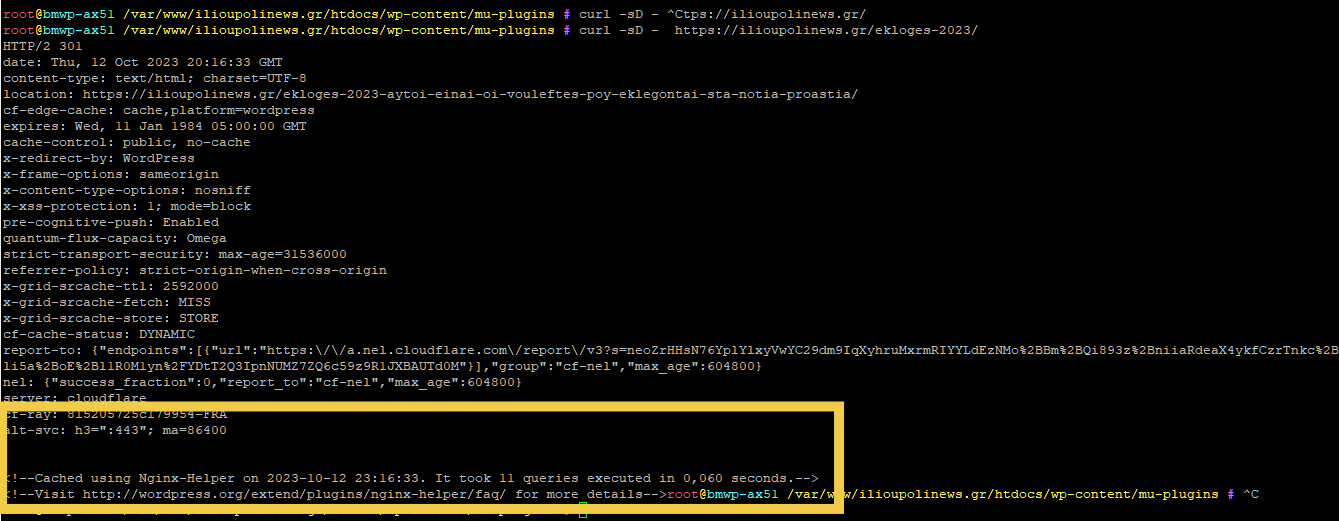
To see a url which time was last cached type the following command:
** Do not forget to add the / at the end of the url **
If the page is cached you should see a message from the NGINX Cache plugin like the following:
To see the status of the cache use the following command:
To see the status of the cache use the following command:
curl -sD - -o /dev/null https://power-tax-training.gr/curl --head https://ilioupolinews.gr/Explanation
Both of these commands use the curl utility to make an HTTP request to the URL “https://ilioupolinews.gr/,” but they serve slightly different purposes:
- curl –head https://ilioupolinews.gr/
- This command sends an HTTP HEAD request to the specified URL, which essentially asks the web server to provide only the response headers and not the actual content of the web page. The
--headoption is used to indicate that you want only the headers. - It does not download the webpage’s content, and it is useful when you want to check the response headers, such as the status code, content type, or any specific headers, without downloading the entire page.
- This command sends an HTTP HEAD request to the specified URL, which essentially asks the web server to provide only the response headers and not the actual content of the web page. The
- curl -sD – -o /dev/null https://ilioupolinews.gr/
- This command also sends an HTTP request to the specified URL, but it includes additional options:
-s: This option makescurloperate in “silent” mode, which means it won’t show progress or error messages. It makes the output cleaner.-D -: This option tellscurlto include the response headers in the output. The hyphen (-) after the -D option indicates that the headers should be printed to the standard output.-o /dev/null: This option tellscurlto save the actual content of the HTTP response to/dev/null, effectively discarding it. The-ooption is typically used to save the response content to a file, but in this case, it’s being saved to a special device file/dev/nullto discard it.
- This command also sends an HTTP request to the specified URL, but it includes additional options:
In summary, both commands retrieve the response headers, but the first command (curl --head) does so explicitly for headers, while the second command (curl -sD - -o /dev/null) retrieves headers and discards the actual content of the web page. The second command is often used when you’re interested in the headers but don’t want to save or display the page’s content.