
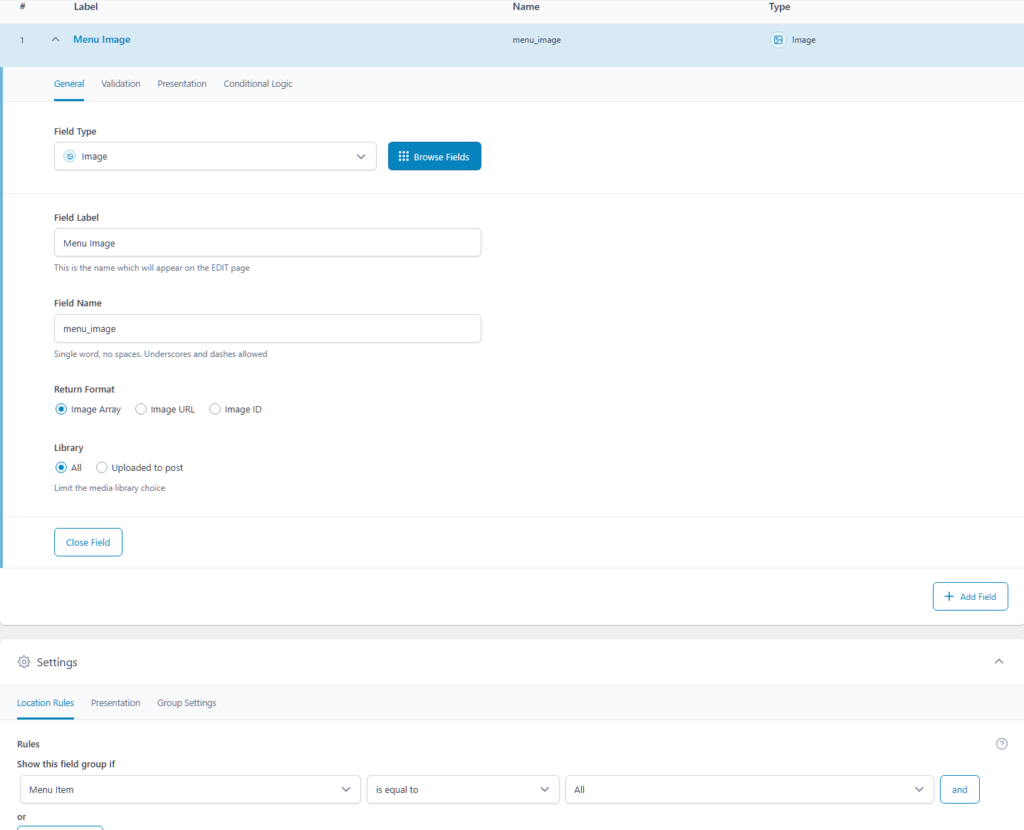
Create the custom fields on ACF
Create a new field group and add an Image field mapped to all menu items.
Create the walker
If you like to add an image before your menu title name in the WordPress we have created a custom walker to achieve this.
// Custom walker class to add ACF field to menu
class Walker_Nav_Menu_Custom extends Walker_Nav_Menu {
    // Start the element output
    public function start_el(&$output, $item, $depth = 0, $args = null, $id = 0) {
        // Get the ACF field (image field)
        $menu_image = get_field('menu_image', $item);

        // Build the normal menu output
        $output .= '<li class="menu-item-' . $item->ID . ' menu-item-' . sanitize_title($item->title) . '">';

        // If the image exists, display it
        if ($menu_image) {
            $output .= '<img src="' . esc_url($menu_image['url']) . '" alt="' . esc_attr($menu_image['alt']) . '" class="menu-image" width="26" height="26"/>';
        }

        // Add the link and title
        $output .= '<a href="' . esc_url($item->url) . '">' . esc_html($item->title) . '</a>';
    }

    // Close the element output
    public function end_el(&$output, $item, $depth = 0, $args = null) {
        $output .= '</li>';
    }
}
Choose where to display it
Now use this filter to enable the walker for all menus. You can modify this code to make it work in a specific WordPress menu
// Filter to use the custom walker
function use_custom_walker($args) {
    $args['walker'] = new Walker_Nav_Menu_Custom();
    return $args;
}
add_filter('wp_nav_menu_args', 'use_custom_walker');