
Step 1
First you need to get the correct shipping rate Ids for “Delivery by express mail ($35)” and also for “Free shipping by express mail”.
This can be do when inspecting the generated html code (with your browser inspector) on your shipping methods radio buttons. so you will see something like:
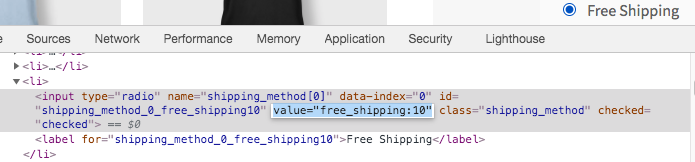
where the shipping method rate Id is free_shipping:10 (the radio button “value”).
Step 2
The code below will hide “Paid delivery by express mail (cost $35)” when “Free delivery by express mail” is available $(you will have to set both shipping rate Ids)*:
add_filter( 'woocommerce_package_rates', 'customizing_shipping_methods', 10, 2 );
function customizing_shipping_methods( $rates, $package ) {
    $flat_express_delivery_rate_id = 'flat_rate:12'; // Paid delivery by express mail (cost $35)
    $free_express_delivery_rate_id = 'free_shipping:10'; // Free delivery by express mail

    // When Free delivery by express mail is available
    if( isset($rates[$free_express_delivery_rate_id]) ) {
        // Remove Paid delivery by express mail (cost $35)
        unset($rates[$flat_express_delivery_rate_id]);
    }
    return $rates;
}
Code goes in functions.php file of the active child theme (or active theme). Tested and works.
Refresh shipping methods
Once you have saved this code, empty cart to refresh shipping methods, or if needed, go to shipping areas settings, then disable / save and re-enable / save any shipping methods from a shipping zone.