
Its always clever to have frequently backups for our work. But how we can enable them within the DDEV?
The answer is not straightforward. Requires some steps in order to make this happen. Lets see:
1. Create the rsync bash script
Just replace iakovos in our case with your linux username
nano /home/iakovos/backup.shand paste your rsync command where:/home/iakovos/dev is the folder you want to backup and the f/WSL-Backup is the destination folder
#!/bin/bash
rsync --archive --verbose --delete /home/iakovos/dev /mnt/f/WSL-Backup
2. Make the script executable
chmod +x /home/user/backup.shNow we have extracted the linux folder to a windows folder and our files are visible to the clone program.
3. Setup the cronjob in Windows
1. Press Windows Key + S
2. Type Task Scheduler
3. Click to open it
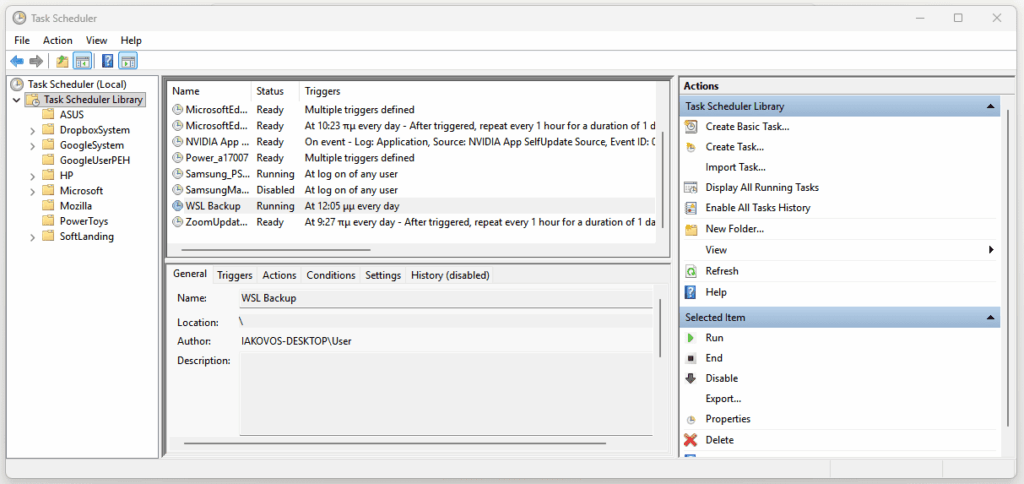
4. Create the scheduled task
1. Click Create Basic Task on the right side
2. Name: `WSL Backup` → click Next
3. Trigger: Select `Daily` → click Next
4. Set your preferred time (e.g. `02:00:00 AM`) → click Next
5. Action: Select `Start a program` → click Next
6. Fill in: – Program/script `C:\Windows\System32\cmd.exe` – Add arguments* `/c start /min wsl bash /home/iakovos/backup.sh`
7. Click Next then Finish
Be careful in step 6 you have to set the same path with step 1
5. Create database backup for each site you work on
enter your project
cd /home/dev/your-project-nameand edit your .yaml file in our case is
nano .ddev/config.yamlgo to the bottom of the file and add a new hook to work every time you stop the project.
hooks:
  pre-stop:
    - exec-host: 'mkdir -p .db-backups && ddev export-db --file=.db-backups/db.$(date +"%d-%m-%Y-%H-%M-%S").sql.gz'
Don’t forget each time you want to close this project to run the command ddev stop in order to create the latest database backup.