
MXroute perfect emails without deliverability issues
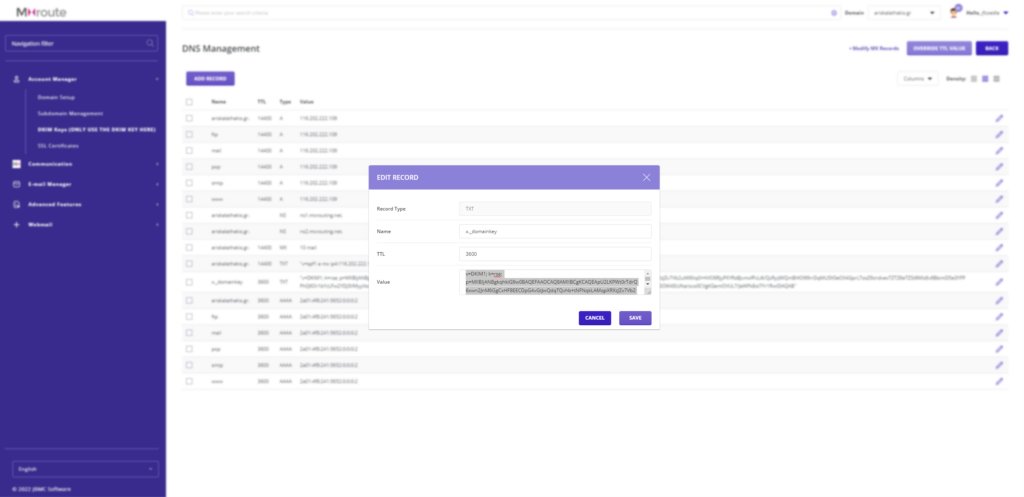
Copy the DKIM Keys straight from the Edit Record menu and add it to CloudFlare without the quotation marks “ before and after it.
Add A DMARC Record
Add a new txt Record named _dmarc and add this as value v=DMARC1; p=none
| Record Type | Name | Value | TTL |
|---|---|---|---|
| TXT | _dmarc | v=DMARC1; p=none;, p=reject;, p=quarantine; | Default |
Add the Correct SPF Record
| Record Type | Name | Value | TTL |
|---|---|---|---|
| TXT | yourdomain.com | v=spf1 include:mxlogin.com -all | Default |
(OPTIONAL) How to Add Multiple SPF records in the same domain name
For example, if you have 2 TXT records on yourdomain.com:
| Record Type | Name | Value | TTL |
|---|---|---|---|
| TXT | yourdomain.com | v=spf1 include:_spf.google.com -all | Default |
| TXT | yourdomain.com | v=spf1 include:servers.mcsv.net -all | Default |
All emails sent on behalf of yourdomain.com will fail SPF authentication with PermError.
In order to fix this, you need to add all the mechanisms that contain legitimate IP addresses in 1 SPF record, as shown below:
| Record Type | Name | Value | TTL |
|---|---|---|---|
| TXT | yourdomain.com | v=spf1 include:_spf.google.com include:servers.mcsv.net -all | Default |
For SPF authentication to pass, all these conditions must be met:
- you have exactly 1 SPF record on your domain;
- the record’s syntax is correct;
Never forget to test your settings
Go to the website mail-tester.com send a test email to the provided email address and see if you get the 10/10 perfect score. If not please redo change in settings and test over again.